Skip to content
Café billing software for India

Café billing that keeps
your whole day in sync.

The kitchen sees each order the moment the counter taps it. At closing, count the drawer and see if the cash matches. On the PC, laptop or Android tablet you already own.

Free setup and practice. No free trial.
Starter ₹999 or Plus ₹1,299 a month. Final amount, GST not charged.

Devices, Rush Mode & support

Use Chrome or Edge on your PC or laptop, or Chrome on an Android tablet. iPhone and iPad are not supported.

New: Rush Mode for the busy hour, and the Android app for tablets and phones with RushSafe, being rolled out to founding cafés. See Rush Mode

Comparing billing software for your café? See what a café POS should do.

Questions? Call or WhatsApp our support and sales line: +91 99969 02243

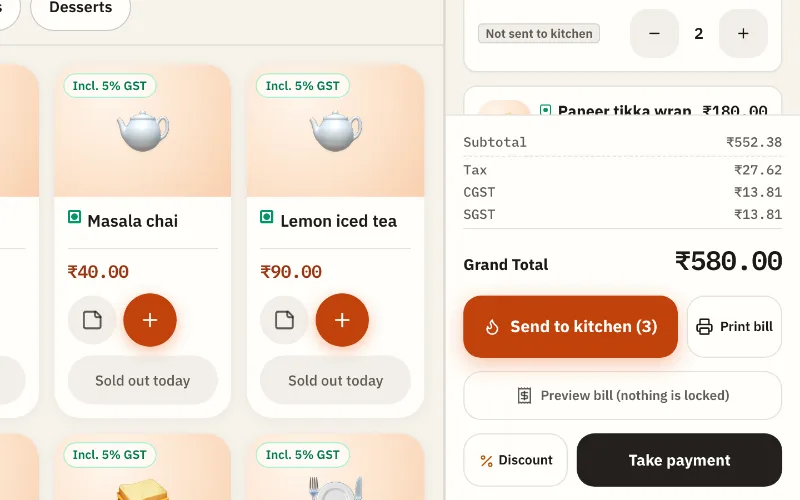
The Nivala counter screen in practice mode with sample data: a menu of café dishes, and table T-02 with 2 Cappuccino, a Paneer tikka wrap and a Chocolate brownie, grand total ₹580 including GST, and the Send to kitchen button.
Sample dataReal Nivala screen, practice mode
a month per café. Final amount, GST not charged.
₹999
hardware to buy. Use your PC, laptop or Android tablet.
0
commission on what your guests pay you.
0%
approvals to wait for. Create your café and start setting up today.
0

One order, from counter to kitchen to closing.

Real Nivala screens, with sample data. This is what your team taps during service, and what you check at the end of it.

  1. Nivala counter with sample data: dish tiles and an open ticket, grand total ₹580, with Send to kitchen and Take payment buttons.
    Sample dataReal Nivala screen, practice mode

    01 Order

    Tap the dishes. Send to the kitchen.

    Tables, takeaway or the counter. GST is on the bill. No slips to walk across.

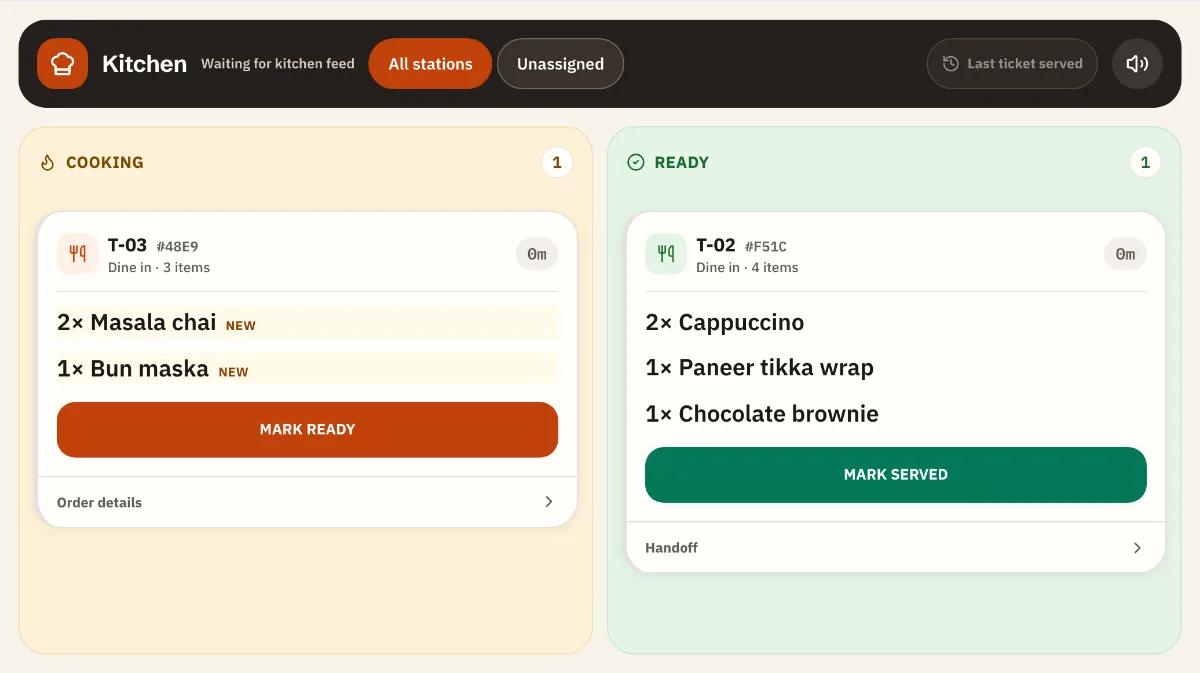
  2. Nivala kitchen screen with sample data: table T-03 with 2 Masala chai and a Bun maska in Cooking, and table T-02 in Ready with a Mark served button.
    Sample dataReal Nivala screen, practice mode

    02 Kitchen

    The kitchen sees it at once.

    Cooking, then Ready, then Served. Everyone sees how long each order has waited.

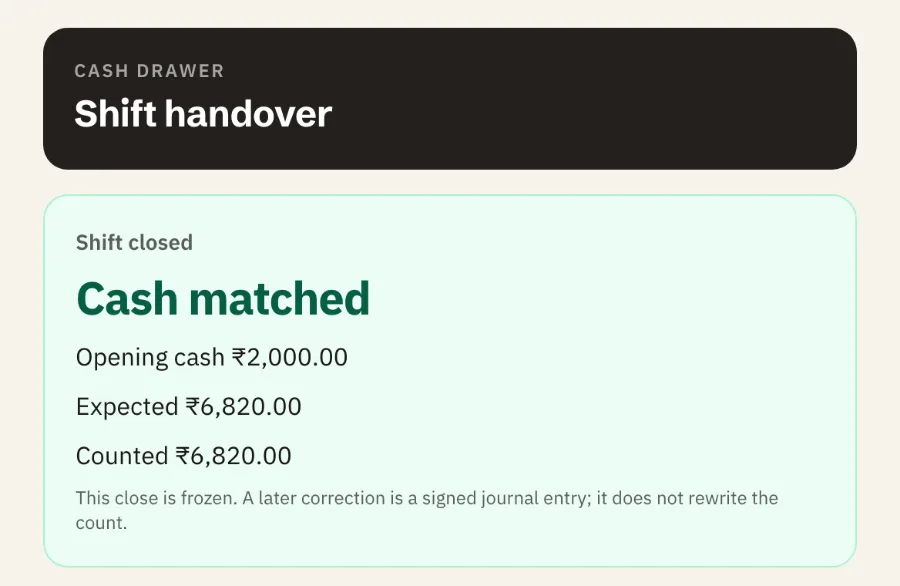
  3. Nivala shift close with sample data: Cash matched. Opening cash ₹2,000, expected ₹6,820, counted ₹6,820.
    Sample dataReal Nivala screen, practice mode

    03 Closing

    Count the drawer. See if the cash matches.

    The answer comes first: matched, or how much short or over. If it is different, the app asks why.

See a full day on NivalaPayments: cash, UPI and card are recorded by staff, not checked with the bank.

Comparing café billing software? See what a café POS should do.

Pricing

Two plans. Monthly. No setup fee.

Both plans run the counter, the kitchen screen and the closing the same way. Plus adds stock, recipes and an estimated cost view. Set up and practise free before you pay.

Starter

₹999a month per café

Final amount. GST not charged.

Everything to run the counter, the kitchen and the close.

Choose Starter if you want quick billing, the kitchen screen and a daily cash check.

  • Orders for tables, takeaway and the counter
  • Kitchen screen included
  • GST bills, and a CSV for your CA
  • Cash, UPI and card recorded by staff
  • Shift close: check the cash matches
  • Expenses and the owner dashboard
  • Download every record as CSV
Create your café

Plus

Adds stock and recipes

₹1,299a month per café

Final amount. GST not charged.

Starter, plus stock, recipes and an estimated cost view.

Choose Plus if you also want to track ingredients and see an estimated cost for each dish.

  • Everything in Starter
  • Ingredients, purchases and recipes
  • Stock goes down as orders are sent; waste recorded
  • Estimated profit (not audited), with items with a recipe shown
  • Low-stock warnings on the dashboard
Create your café
  • This is the final amount. GST is not charged. Pay monthly. No setup fee. No annual plan.
  • There is no free trial. Setup and practice are free. You pay when you go live. You go live after your first payment is verified.
  • Cancel any time. You keep access to the end of the paid month.
Rush Mode · RushSafe

Built for the busy hour.

Rush Mode puts your menu in big, fixed tiles. RushSafe keeps the order on the counter when the internet slows.

  1. Big tiles, in menu orderMade for a thumb in a hurry. They stay put during service.
  2. One tap adds a dishA dish with options opens the item sheet.
  3. Recent items, one tap awayWhat this counter sold last is right there.
  4. Send to kitchen, next guestThe kitchen ticket shows options and notes.

Sample dataAndroid app, early access for founding cafés. No download link yet. Bills and payments need the internet.

What your team uses during service, and what you see after.

Each part solves one problem in the café day. The pictures follow the real screens, with sample data.

  • Counter billing

    Take orders fast at the counter

    Tap the items, change the quantity, send to kitchen. GST is on the bill. Works in Chrome or Edge on your PC or laptop, or Chrome on an Android tablet.

    • Big touch buttons
    • GST on the bill
    • Staff PINs
    More about counter billing
  • Kitchen screen

    The kitchen sees every order the moment it is sent

    Cooking, then Ready, then Served. Everyone sees how long each order has waited. Included on both plans.

    • Chrome on an Android phone or tablet
    • Wait time on every order
    • Sold out today
    More about kitchen screen
  • Payments and shift close

    Record every payment. Check the cash matches.

    At close, count the drawer. The answer comes first: cash matched, or how much it is short or over. Then the day’s total. If the cash is different, the app asks why. UPI is recorded by staff, not checked with the bank.

    • Cash, UPI, card
    • Refunds on the original order
    • Matched closes counted on Home
    More about payments and shift close
  • Owner dashboard

    See the day without asking anyone

    Sales, orders, cash, UPI and card, expenses and refunds, from your own records. On Plus, stock used and an estimated profit that says it is not audited.

    • Today, this week, any day
    • Top and slow dishes
    • CSV for your CA
    More about owner dashboard

Stock and recipesPlus only

Know what is running out and what a dish costs

Give dishes a recipe. Stock goes down as you sell. Costs are estimates from the prices you entered, not audited profit.

  • Low-stock warnings
  • Estimated cost per dish
  • Waste recorded
More about stock and recipes
app.thenivala.com/app/manage/stock
StockSample data
  • Milk12.5 LLow
  • Coffee beans3.2 kg
  • Paneer1.0 kgLow
  • Bread18 pcs

Recipe · Cappuccino

  • Milk180 ml₹11
  • Coffee beans18 g₹16
  • Sugar8 g₹1
Estimated cost per cup₹28

An estimate from the prices you entered. Not audited.

A café floor during evening service

Honest about the internet

Nivala needs the internet. A sale counts only when our server confirms it, so nothing is billed twice. If the internet stops, new orders and payments cannot be confirmed until it is back. Anything already sent is safe. Nivala does not bill offline. The Android app adds RushSafe, which saves new orders on the counter’s device and sends them when the internet is back.

  • A clear banner when the internet is slow or gone
  • Every order shows its real state: not sent yet, sent, ready, paid
  • Runs in Chrome or Edge on your PC or laptop, or Chrome on an Android tablet
  • A printer is optional. Bills can be shown on the screen.
New, in Beta

Seven Indian scripts for your menus and navigation.

Pick the language you read best. The counter stays in English or Hinglish, so a rush never meets a word nobody has checked.

If your counter staff cannot read Roman letters, Nivala is not right for you yet. We say this before you sign up, not after.

  • हिन्दीHindiBeta
  • मराठीMarathiBeta
  • ਪੰਜਾਬੀPunjabiBeta
  • ગુજરાતીGujaratiBeta
  • தமிழ்TamilBeta
  • తెలుగుTeluguBeta
  • ಕನ್ನಡKannadaBeta
  • HinglishHindi in Roman lettersCounter too

Switches today

  • Menus and navigation, in the script you pick
  • Dish names you type in your own script, found by counter search
  • Sign-in and signup show the language you chose

Stays in English or Hinglish

  • Counter, payment and bill words
  • Kitchen screen words
  • Until native speakers have checked them. We have set no date.

Hindi in Roman letters is the one counter-ready option today. Read the full limits

Create your café

Create your café. Setup and practice are free.

Set up and practise now. Pay when you are ready to start live billing.

Create your café

Not sure yet? Check Nivala against your own records first, or see who it is not for yet.

Prefer to talk? Support and sales line: +91 99969 02243

What happens next

  1. 01You create your account and land straight in setup. Nobody has to approve it.
  2. 02You load the menu and staff PINs and practise with sample orders. Practice never touches real numbers. Free.
  3. 03You confirm your email with the link we send. You can keep going while you wait.
  4. 04You pay when you choose a plan and go live.

Prefer to talk first? Leave your number and we will call you in our support hours. You do not need a call to start.

Ask for a call

Optional

We call this number in our support hours. WhatsApp is fine.

Only used to answer you.

We use your name, email and phone only to run your account, to confirm your email and, if you ask, to call you. If the email is never confirmed and you never pay, we remove them after 30 days of inactivity. Privacy

Setup and practice are free. You pay when you go live. Starter is ₹999 a month per café. Plus is ₹1,299 a month per café. This is the final amount. GST is not charged. There is no free trial.

Straight answers

Something else? hello@thenivala.com

What is Nivala?

Billing, a kitchen screen and the day’s numbers for one café in India. It runs in Chrome or Edge on the PC or laptop you already own, and in Chrome on an Android phone or tablet. iPhone and iPad are not supported. You take orders, send them to the kitchen, record cash, UPI and card, close the shift and see the day.

Who is it for?

One independent café with a counter and a kitchen, from a busy counter to a few dozen seats. Not cloud kitchens. Not chains with many outlets.

Is there a free trial?

No. Setup and practice are free; you pay when you go live. You load your menu and staff and try full orders on a practice copy that never touches your real numbers. You go live after your first payment is verified.

How much does it cost?

Starter is ₹999 a month per café. Plus is ₹1,299 a month per café and adds stock, recipes and an estimated cost view. This is the final amount. GST is not charged. Pay monthly. No setup fee. No annual plan.

Do I need to buy anything?

No. We do not sell hardware. Use Chrome or Edge on your PC or laptop, or Chrome on an Android tablet at the counter, and Android phones for the owner and kitchen. A printer is optional. Bills can be shown on the screen.

Does Nivala work in Hindi or other Indian languages?

In English or Hinglish (Hindi in Roman letters), yes, including the counter. Seven Indian scripts (Hindi, Marathi, Punjabi, Gujarati, Tamil, Telugu and Kannada) are in Beta: menus and navigation switch, and counter search finds dish names typed in your script. The counter, payment, bill and kitchen words stay in English until native speakers have checked them, and we have not set a date.

What happens if the internet stops?

New orders and payments cannot be confirmed until the internet is back. Anything already sent is safe. A sale counts only when our server confirms it, so nothing is billed twice. Nivala does not bill offline. The Android app’s RushSafe, being introduced with the app, saves new orders on the counter’s device and sends them when the internet returns. It does not bill, take payment or tell you the kitchen received a ticket while you are offline.

Does it do GST bills?

Yes. Numbered tax invoices, bills of supply or plain receipts, as your tax profile says. Your CA still files the return; we give you a CSV. We are not a filing service.

What does Nivala not do?

There is no service-charge line on the bill. If your café adds one, enter it as a menu item and check its GST with your CA. Nivala does not make an e-invoice or print an IRN. A café above the e-invoicing limit needs another tool; check your limit with your CA. Nivala does not file or prepare your GST returns. You get CSV downloads for your CA. Nivala does not make a bill or tax invoice for orders that come through delivery apps such as Swiggy or Zomato. You can type or paste each one at the counter so the kitchen gets it and it is in the day’s numbers. Ask your CA how to record the tax. Every bill is a sale within your café’s own state. Sales to other states are not supported.

Does Nivala take payments?

No. Your guests pay into your own UPI QR, UPI speaker or card machine as they do today. Your staff record what was paid and how. Nivala does not check this with your bank.

What does the owner dashboard show?

Sales, orders, cash, UPI and card collected, refunds, expenses, cash differences at shift close, and your top and slow items. On Plus, stock used and an estimated profit that says it is not audited.

What if I stop paying or want to cancel?

You can cancel any time; you keep access until the end of the month you paid for. After that, your records stay readable and you can download them as CSV.

Do you give refunds?

Monthly fees already paid are not refunded. If we charge you twice or charge the wrong amount, we refund the extra in full within 7 working days.

How do I get help?

Email hello@thenivala.com, Monday to Saturday, 10 am to 7 pm IST. We help you set up the first time. We do not promise an instant reply and we are not 24/7.

Can I sign up on my own?

Yes. Create your café, choose a password and start setting up and practising straight away. There is no approval to wait for. Confirm your email with the link we send, and pay only when you choose a plan to go live.

Ready to run your counter on the device you already own?

Create your café and start setting up and practising for free. Starter is ₹999 a month per café. Plus is ₹1,299 a month per café.

Create your café