
One order, from counter to kitchen to cash to closing.
Three real Nivala screens, with sample data: the counter takes the order, the kitchen cooks it, and the shift closes with a cash check.
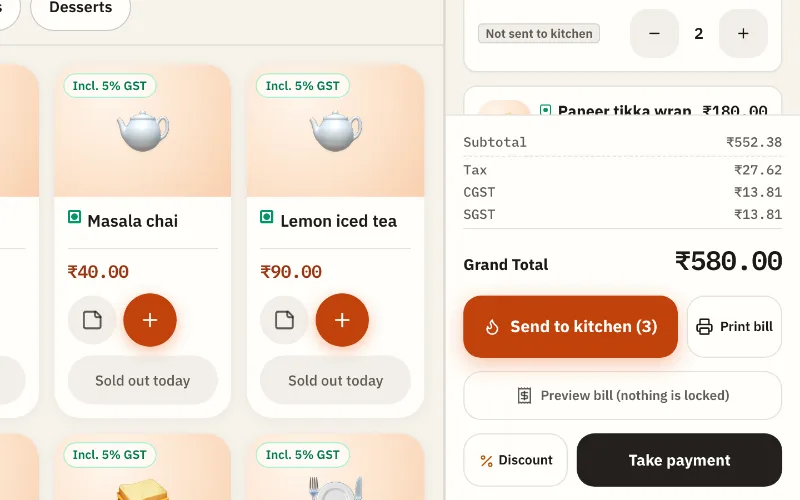
Sample dataReal Nivala screen, practice mode 01 Order
Tap the dishes. Send to the kitchen.
Tables, takeaway or the counter. GST is on the bill. No slips to walk across.
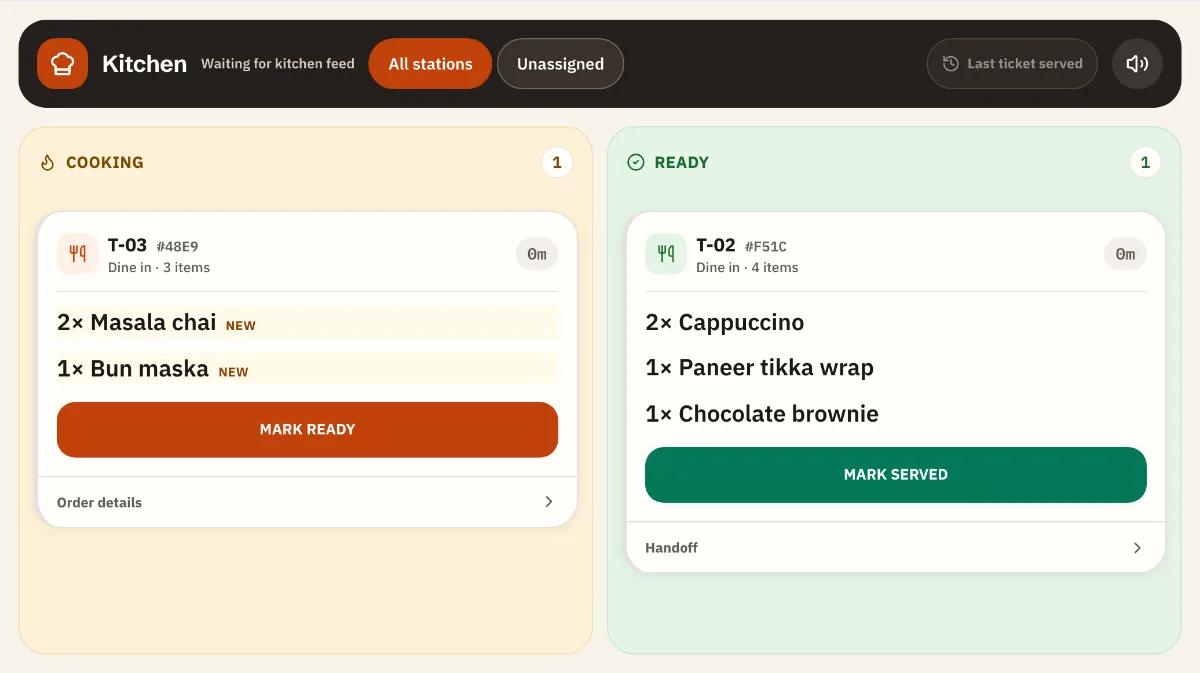
Sample dataReal Nivala screen, practice mode 02 Kitchen
The kitchen sees it at once.
Cooking, then Ready, then Served. Everyone sees how long each order has waited.
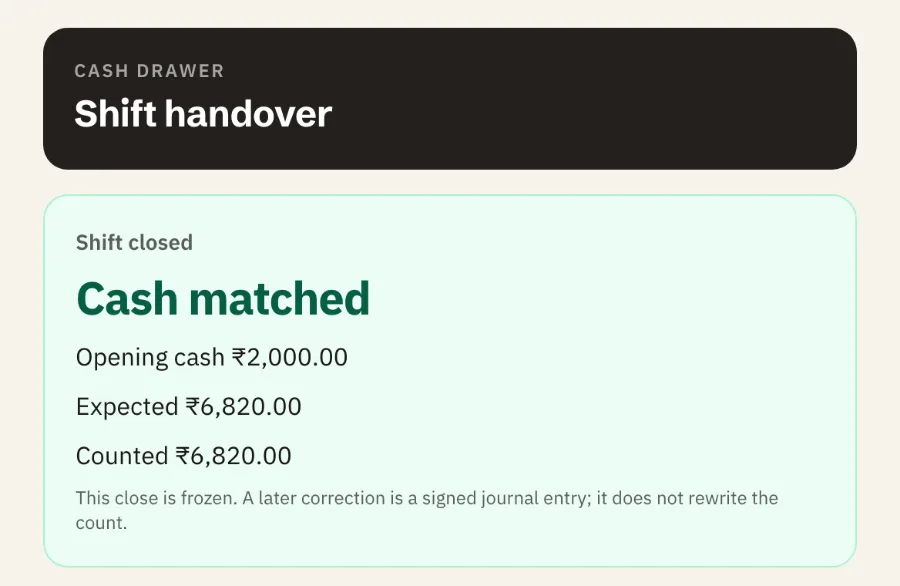
Sample dataReal Nivala screen, practice mode 03 Closing
Count the drawer. See if the cash matches.
The answer comes first: matched, or how much short or over. If it is different, the app asks why.
The whole day, step by step.
From opening the shift to the owner seeing the day. The pictures below are drawn from the app’s screens, with sample data.
1. Open the shift
A staff member signs in with their PIN and enters the cash in the drawer at the start.
2. Take orders at the counter
Tap the items for a table, takeaway or the counter, then tap "Send to kitchen". Rush Mode, in the browser and in the Android app, gives you big tiles in menu order for the busy hour.
- 2Cappuccino₹360
- 1Veg sandwich₹150
- 1Masala chai₹40
3. The kitchen cooks
The order shows on the kitchen screen. The cook taps Cooking, then Ready.
- 2 × Cappuccino
- 1 × Veg sandwich
- 1 × Cheese maggi
- 2 × Filter coffee
- 3 × Cold coffee
- 1 × Bun maska
Cancelled by Priya
Seen, stop cooking4. Take payment
Show or print the bill. Record cash, UPI or card. The order is marked Paid.
5. The internet slows
Bills and payments need the internet. On the Android app, RushSafe saves the new order on the counter’s device and sends it when the internet is back. It never says the kitchen has it until it does.
6. Close the shift
Count the drawer. If the cash is different from what it should be, say why.
Cash is short by ₹5. Why is the cash different?
“Gave ₹5 change from my pocket, forgot to note it.”
Cash
₹4,120
Counted
UPI
₹8,120
Recorded by staff
Card
₹1,400
Recorded by staff
UPI and card are what staff recorded. Nivala does not check them with your bank.
7. See the day
The owner opens the dashboard: sales, collections, expenses, refunds, and what needs a look.
Sales today
₹13,640
Collected
₹13,640
Orders
92
Expenses
₹1,180
Sales by hour
10 am to 10 pmNeeds a look
- Cash short at close−₹5
- Low stock3 items
- Estimated profit (not audited)₹4,230
The same day, on a tablet and a phone.
The Android app is for Android tablets and phones from Android 12. It is being rolled out to cafés in the founding group, so there is no download link yet. RushSafe is being introduced with the Android app.
See Rush Mode and RushSafeRush Mode on an Android tablet and phone. Drawn from the app’s screens, with sample data.
From signup to first real order
Set up and practise free, and ask us for help if you want it. You pay only when you go live.
- Today
Step 1 of 4
Create your café
Your name, café name, city, email and a password. You go straight to setup. There is no approval to wait for.
- Free
Step 2 of 4
Set up your café
Load your menu, add staff PINs, confirm your GST profile, open the app on your counter device. Confirm your email with the link we send; you can keep going while you wait.
- Free
Step 3 of 4
Practise with sample orders
Try full orders on a practice copy. Practice bills say PRACTICE and never touch your real numbers.
- Go live
Step 4 of 4
Pay ₹999 or ₹1,299 a month and go live
Choose Starter or Plus and pay the first month. Once it is verified, enter the cash in the drawer and take your first real order.
There is no free trial. Setup and practice are free. You pay when you go live. This is the final amount. GST is not charged.
Check us before you trust us.
Who runs Nivala, where your data lives, and how to compare Nivala with your own books before you pay anything.
- Who runs NivalaA small business run by one person. Who, where, and how to reach us.
- Your data is yoursDownload all of it, any time. Where it lives, how long we keep it, who handles it.
- Switching from paper or PetpoojaWhat comes across, what stays behind, and the steps in order.
- The practice-day guideSix checks to compare Nivala with your own books before you pay.
- Who Nivala is for, and not yetThe cafés it suits, and the ones we would rather tell now.